Today
One number that matters
Your monthly spending budget is split across the days of the month. The Today screen shows what's left to spend right now, with a quick-add form for amount, tag and note.
Live product
Budget turns a monthly plan into a daily allowance, with quick expense entry and an assistant that asks before making changes.
The real app interface, populated with sample data.
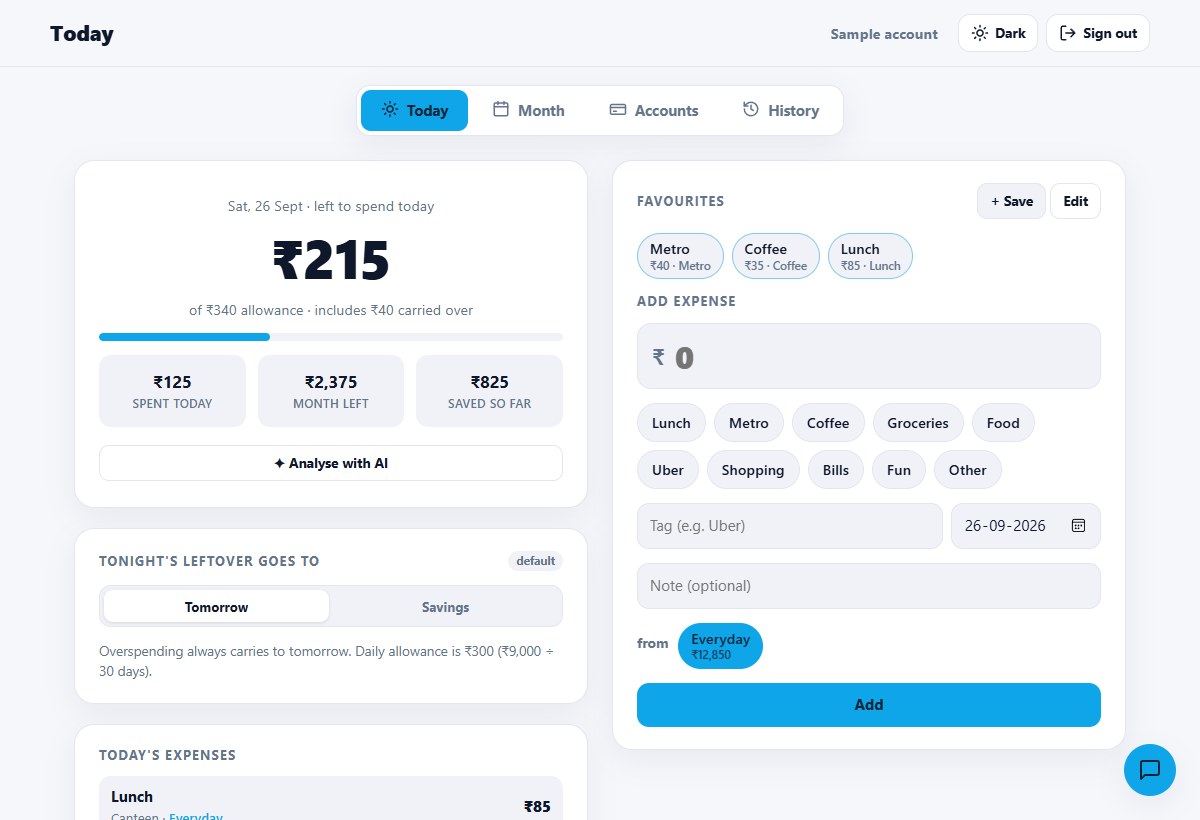
A daily allowance accounts for spending and carry-over. The monthly plan stays visible behind the daily decision.
Saved favourites reduce entry to a tap. Amount, tag, date and account remain editable.
The text-and-voice assistant proposes an action before it changes your data. Common shorthand can be parsed without a model call.
Live personal product. New accounts require an invitation.
Today
Your monthly spending budget is split across the days of the month. The Today screen shows what's left to spend right now, with a quick-add form for amount, tag and note.
Favourites
Save the things you buy often — metro, chai, lunch — with or without a fixed amount. Tapping one fills the expense form instantly, ready to add or adjust.
Rollover
Unspent money can carry to the next day or be swept into savings — a monthly default with a per-day override. Overspending always carries forward so the month stays honest.
Month
Salary in; rent, family transfers, EMIs and SIPs out, with paid ticks. What's left after commitments funds your spending budget and planned savings. Plans copy forward each month. Tap any tag in the spending-by-tag breakdown to see and edit every expense filed under it.
Accounts
Bank balances and cash, credit card and loan outstandings, and locked assets like FDs and mutual funds that sit outside net worth until you toggle them in with a Liquid / With Locked switch.
Auto-sync
Keep balances manual, or turn on sync and pick default accounts — from then on, expenses, paid commitments, received income and transfers move real money automatically. Any single entry can still be pointed at a different account, or none. A reality-check panel compares the plan against your accounts and reconciles any gap with one tap.
Assistant
A built-in chat assistant answers questions about your budget and can add, edit or delete expenses and income/commitment items — by text or voice. It always proposes the change first and waits for a tap to confirm; nothing is written silently. Common shorthand ("200 uber hdfc") is parsed instantly with no AI call, with typo-tolerant matching against your real accounts and past tags; anything more open-ended goes to Gemini, which falls back to Cloudflare Workers AI automatically if it's ever unavailable.
How it's built
A Cloudflare Worker serving a vanilla JS PWA and a JSON API from the same origin, with D1 (SQLite) for storage, PBKDF2 password hashing, HttpOnly session cookies, its own installable icon, invite-code gated sign-up, and a Gemini-backed assistant with an automatic Workers AI fallback.